" height="58.86800609536114px" id="N8YV9UcAu" transform="translate(13.121 10.566)" width="53.757757591804435px"/></g></svg>)
UI/UX Design
Accessibility
Product Design
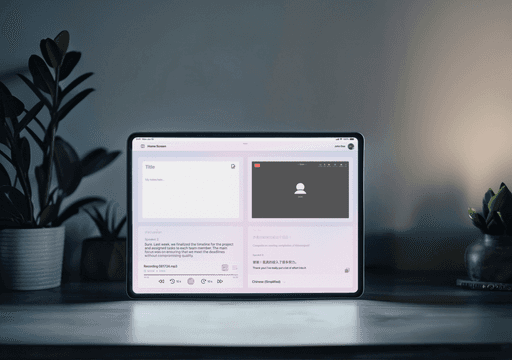
Empower is a concept for Go Virtual PH that unifies video calls, notes, audio recordings, and speech‑to‑text into one customizable workspace designed for users with hearing disabilities.


Problem
Users with hearing disabilities often rely on a stack of tools—Zoom for calls, separate note apps, and transcription services like Otter—to participate in meetings, which forces constant context‑switching and window juggling. Even though platforms like Zoom have improved their captioning and accessibility options, these features still live in separate panels and don’t solve the broader problem of scattered notes, recordings, and follow‑ups across multiple apps. This fragmented setup increases cognitive load, makes it easy to miss information, and creates friction for anyone trying to keep up with fast‑moving discussions.
Solution
Empower consolidates video calls, notes, audio recording, and live speech‑to‑text into a single, customizable dashboard so users can follow, capture, and review conversations without leaving the main workspace. The interface is designed with accessibility at the center: high‑contrast visuals, large touch targets, and clear iconography make key actions instantly recognizable, even in busy meeting contexts. A flexible grid layout lets users resize, reorder, and pin their most‑used panels, so the workspace adapts to their workflow instead of forcing them into a rigid, one‑size‑fits‑all layout.


Research
I mapped typical collaboration workflows for users with hearing disabilities, focusing on how they currently combine tools like Zoom, note‑taking apps, and transcription services to participate in meetings. I reviewed accessibility guidance and existing collaboration platform features (live captions, transcripts, keyboard shortcuts) to understand what’s already available and where gaps remain in real‑time usage. These insights highlighted that the main barrier wasn’t only the presence of captions, but the overhead of managing multiple disconnected tools while trying to stay engaged in the conversation.
Competitor
Empower conceptually competes with: Video platforms that integrate accessibility features (Zoom, Teams). Transcription and meeting‑notes agents that join calls and create transcripts and summaries. Where these products focus on “adding” captions or transcripts on top of existing meetings, Empower differentiates by treating accessibility, note‑taking, and recordings as first‑class panels in one unified interface, rather than separate destinations.
Planning
I began by mapping end‑to‑end meeting participation: joining a call, following the conversation, capturing notes, reviewing transcripts, and revisiting recordings. From these flows, I identified the moments when users had to switch between 3–4 tools and sketched layouts that brought those functions into a single, glanceable dashboard. I translated these flows into a modular grid system—panels for video, notes, audio, and speech‑to‑text—defining resizing rules, pinned states, and responsive behavior so users can tailor the workspace without losing clarity or hierarchy.


Conclusion
Empower refines the remote collaboration experience for users with hearing disabilities by removing the need to juggle multiple apps during live meetings. By combining video, notes, audio recording, and speech‑to‑text in one customizable, accessibility‑first interface, the design reduces app‑switching, cuts navigation time, and makes it easier to stay present in the conversation. The concept also contributes a flexible grid and accessibility‑driven component patterns that can inform future work at Go Virtual PH, seeding a more inclusive, systemized approach to collaboration tooling.


